

Wulf Mods
Wulf Mods UNI 3.0 Universal Variable Voltage Battery
$49.99
Only 49 left
- Capacity
- 650 mAh
- Voltage
- 1.8V - 4.2V
- Charging
- USB-C
- Operation
- Multi Button
- Free shipping over $69
- Plain, unmarked packaging
- Secure checkout
- 30 day returns
| Specifications | |
|---|---|
 mAh mAhThe battery's capacity measured in milliamp-hours (mAh). Higher mAh indicates longer usage between charges.
|
|
 Charging ChargingSpecifies the charging connector type (e.g., Micro USB, USB-C). Ensure compatibility with your charging cable.
|
|
 Adjustable Voltage Adjustable VoltageAllows you to customize the voltage level, providing control over vapor intensity and flavor experience.
|
|
 Operation Method Operation MethodDescribes how the battery activates: Draw-activated (inhale to activate) or Button-activated (press button to activate).
|
Multi Button
|
 Preheat Mode Preheat Mode |
|
 Cart Compatibility Cart Compatibility |
0.5g, 1g, and 2g
|
 Concealed Cart Concealed CartCartridge fully enclosed by device for maximum discretion
|
|
Description
The UNI 3.0 Takes Control

Update your sessions with the latest Wulf Pack cloud-ware by grabbing yourself a Wulf Mods UNI 3.0 Universal Variable Voltage Battery! With the UNI 3.0 we set out to unleash your sessions with unparalleled customizability, resulting in a 650mAh battery with both incrementally adjustable voltages from 1.8 - 4.2v and the ability to adjust cartridge height and width at will via an intuitive dial system. This gives you more control over than ever, for a truly next generation cartridge experience with zero limitations.


Access your settings easily through the full body digital display and add your own mark by choosing between a variety of backgrounds, including our classic Wulf Mods logo. For faster loading, the UNI 3.0 utilizes a magnetic adapter that makes swapping in a new cartridge swift and secure. All this makes the Wulf Mods UNI 3.0 the ultimate choice for those looking to step up their cartridge game and get more out of their clouds. Make sure your Wulf Mods UNI 3.0 matches your pack’s vibes by looking over the 5 available colors including spatter hits like black-red and purple black.

Loading the Wulf Mods UNI 3.0
Get your clouds ready to howl by first loading a cartridge into your Wulf Mods UNI 3.0. To do so, make use of the included magnetic threaded adapter and attach your desired cartridge. Once the two are joined, you can carefully attach the cartridge to your device and enjoy the power of a strong magnetic connection.

Adjusting Height On The Wulf Mods UNI 3.0
To alter the height of your cartridge while attached to the Wulf Mods UNI 3.0, make use of the slider located on the back of the device. Either push up or down, to adjust the current height of your loaded cartridge to your desired spot. This allows the UNI 3.0 complete compatibility with cartridges measuring 42mm and over.

Adjusting Width On The Wulf Mods UNI 3.0
Seamlessly change the width of your Wulf Mods UNI 3.0 cartridge attachment by utilizing the dial located right at the top of the device. By spinning in back and forth, you are able to expand and contract the diameter of the connection all the way from 11mm - 16mm. This allows for cartridges up to 2 grams in size to be attached with ease and give you a more secure session.
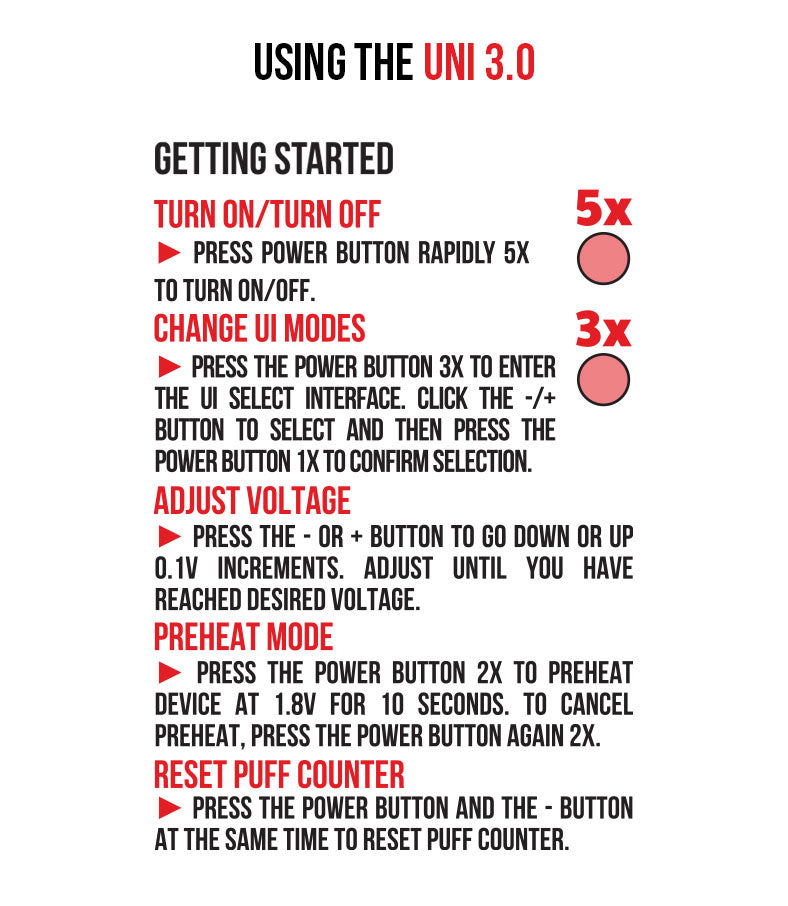
Using Your Wulf Mods UNI 3.0
Start howling on your cartridge by pressing the power button 5x in a row to turn your Wulf Mods UNI 3.0 on. When successfully input, your display screen will spring to life. From here you can hold down the power button and inhale from your cartridge at will. Whenever you’ve had enough, just press the power button another 5x in a row and your device will go to sleep.
To reset the puff counter on your Wulf Mods UNI 3.0, press and hold both the + and - buttons down at the same time. This will revert your count to zero and allow for a fresh start.
Swap between the different background UI modes on your Wulf Mods UNI 3.0 by pressing the power button 3x in a row to bring up the UI selection screen. Once here, you can use the + and - buttons to precisely switch between the various options. When you’ve found the look you like, press the power button 1x to lock it in.
Adjusting The Temperature On Your Wulf Mods UNI 3.0
In order to alter the temperature of your Wulf Mods UNI 3.0, make use of the + and - buttons to scroll through each setting by increments of .1. This allows you access to all the various temperatures from 1.8 - 4.2v with ease.

Pre-Heating Your Wulf Mods UNI 3.0
For clouds with some extra bite, make use of the pre-heat function by pressing the power button 2x in a row. This will display a 10s countdown on your screen to let you know exactly when you Wulf Mods UNI 3.0 is ready to hit again. Once the countdown is over, then you can take your device and use it as normal for a leveled up cloud.

Charging the Wulf Mods UNI 3.0
To charge your Wulf Mods UNI 3.0, only ever use the included USB-C charging cable. When you first receive your device, plug it in and charge it for an hour. Only ever charge your Wulf Mods UNI 3.0 for 1 hour at a time, anything longer can cause issues with battery lifespan.

Troubleshooting Your Wulf Mods UNI 3.0
To ensure that your sessions stay rolling smoothly, take a look below to learn about the various troubleshooting issues that can arise on your Wulf Mods UNI 3.0.
- Safety Cutoff: When the power button is held down for longer than 15s, your device will read “OVERTIME” and stop heating. To continue your session, release the power button and press it once more.
- Low Battery: If your device doesn’t have enough charge, it will display a “LOW BATTERY” warning and show an image of a depleted battery.
- Short Circuit: If you see a “SHORT CIRCUIT” warning, immediately cease using your device and do not use it again until the warning has subsided.

How to Clean Your Wulf Mods UNI 3.0
Get the most out of your Wulf Mods UNI 3.0 by keeping your device clean. To do so, always make sure you first power down your battery, detach the cartridge, and remove the magnetic adapter. Once all set, you can take a q-tip or swab that’s been dampened with isopropyl alcohol to scrub down all components and ensure that all threads are fully clean. After you’ve completed wiping down the device, make sure to leave ample time for everything to dry before using it again.

What’s Included:
- (1) Wulf Mods UNI 3.0 Universal Variable Voltage Battery
- (1) USB-C Charging Cable
- (1) 510 Threaded Magnetic Adapter
- (1) User Manual
Warning: Do not charge with a power bank of 5V or higher. Do not charge in your car. Do not overcharge the battery or use any other charging cable than what comes with your device. Failure to follow these instructions could result in battery damage and frying of the internal system. If the device gets too hot while you are using it, please stop using it for a while. Please avoid using the device while it is charging.
Shipping & Returns
Returns Policy
You may return most new, unopened items within 30 days of delivery for a full refund. We'll also pay the return shipping costs if the return is a result of our error (you received an incorrect or defective item, etc.).
You should expect to receive your refund within four weeks of giving your package to the return shipper, however, in many cases you will receive a refund more quickly. This time period includes the transit time for us to receive your return from the shipper (5 to 10 business days), the time it takes us to process your return once we receive it (3 to 5 business days), and the time it takes your bank to process our refund request (5 to 10 business days).
Shipping
When you place an order, we will estimate shipping and delivery dates for you based on the availability of your items and the shipping options you choose. Depending on the shipping provider you choose, shipping date estimates may appear on the shipping quotes page.

At a glance
510 Battery specs
- Capacity
- 650 mAh
- Voltage
- 1.8V - 4.2V
- Charging
- USB-C
- Operation
- Multi Button
- Fits carts
- 0.5g, 1g, 2g
- Preheat mode
- Choosing a selection results in a full page refresh.